IaaS - Virtnest
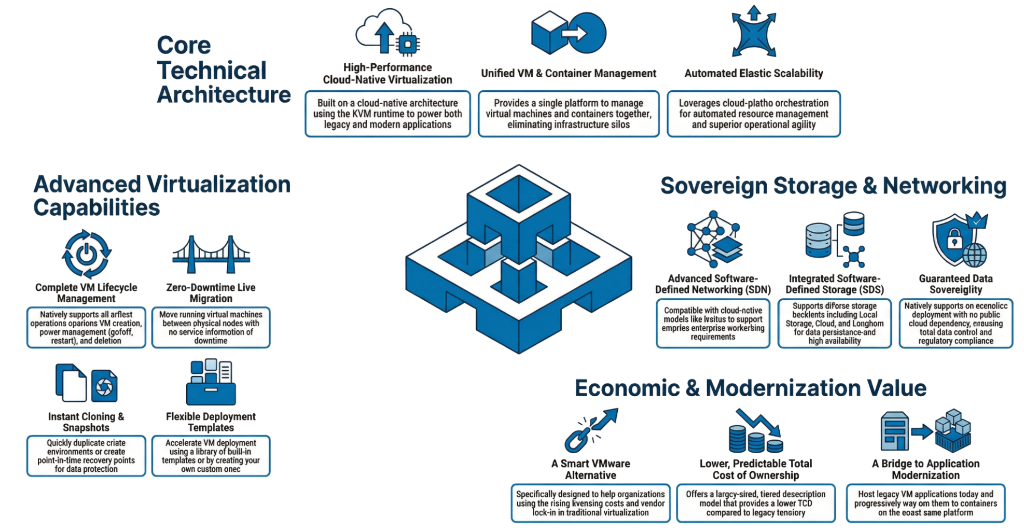
UIS Cloud IaaS, powered by DaoCloud's Virtnest, is a cloud-native virtual machine management platform built on KubeVirt. It seamlessly integrates VMs with containers, enabling unified orchestration and on-premises infrastructure control.
Why Virtnest
With Virtnest, users can fully unleash the potential of Kubernetes clusters for efficient management of virtualized infrastructure. We are committed to continuously optimizing and enhancing Virtnest's containerization capabilities, providing users with a superior virtual machine management experience.
Improved Resource Utilization
Virtnest leverages container images as the foundation for creating virtual machines, effectively enhancing resource utilization. Containerized virtual machines can run applications and configurations independently while sharing the host kernel and hardware resources, reducing resource wastage.
Rapid Deployment and Scalability
With Virtnest, virtual machines can be rapidly deployed and scaled within Kubernetes clusters. By integrating images and containers, virtual machine startup time is reduced, and the number of virtual machines can be dynamically adjusted according to demand. This flexibility enhances resource allocation efficiency and system performance.
Simplified Management and Operations
Virtnest simplifies the process of managing and operating virtual machines within Kubernetes clusters. Administrators can easily handle tasks such as startup, shutdown, configuration, and monitoring of virtual machines using cluster management tools. The streamlined management process reduces complexity and eases administrative burdens.
Flexible Application Deployment
Deploying virtual machines as container images in Kubernetes clusters brings significant flexibility to application deployment. Users can conveniently package different applications and configurations into container images and quickly deploy them in the cluster using Virtnest. This agility enables agile and flexible application deployment.
Seamless Integration with Container Ecosystem
Virtnest combines virtual machines with containers, seamlessly integrating them into existing container ecosystems within Kubernetes clusters. Users can leverage container networking, service discovery, load balancing, and other functionalities while seamlessly collaborating with other containerized applications.
How to Use Virtnest
Here are the general steps to use Virtnest:
Install the virtnest-agent component within the cluster
Build the required virtual machine images and push them to Docker Registry or another container registry
Create virtual machines using one of three available methods
Access the virtual machines via VNC/console
View the list of virtual machines and detailed information about each one
Perform necessary operations such as start/stop, restart, clone, snapshot, restore from snapshot, and live migration as needed
VM Creation Methods
VM Operations
Ready to Transform Your VM Infrastructure?
Experience the power of cloud-native virtual machine management with Virtnest.