Production Deployment at 85,000 Tokens/s: LLM Inference Service SLA Compliance Solution
Authored by the UIS Cloud Reasoning Acceleration Team (Leng Rongfu, Pan Yuanhang, Liu Qijun, Wang Yuqi, Pan Bin, Li Zhongjun, et al.)
After the customer raised the SLA requirement for deploying DeepSeek V3.2, deploying an inference service that meets the SLA requirement under the vLLM open source version was a significant challenge. The UIS Cloud team optimised and improved the use of vLLM, applied targeted fixes, and produced a deployment configuration and final version that meets the SLA requirement, contributing the optimised code back to the community.
01 — SLA and Load Definition
1.1 Performance Targets (SLA)
The performance objectives are defined as follows:
1.2 Load Definition and Statistical Scope
- Statistical definition of TTFT/TPOT: mean
- Calculation formulas and sampling methods for Prefill/Decode tok/s/GPU: Total token throughput (tok/s) / GPUs
- Load type: Minimum ISL/OSL
- Use DeepGEMM warmup, use random seed.
02 — Why Is It Difficult to Directly Meet the Standards by Following the Wide-EP Route?
In the previous article, "vLLM Large Scale Serving: DeepSeek-R1 @ 2.2k tok/s/H200 with Wide-EP", the Wide-EP strategy achieved a throughput of approximately 2.2K tokens/s/GPU on the R1 model. However, directly applying this approach to DeepSeek-V3.2 failed to achieve the same result, primarily due to the following reasons:
- Differences in model structure: DeepSeek-R1 uses MLA, while V3.2 uses DSA.
- The vLLM implementation of Attention in V3.2 is still under continuous iteration and there is still room for optimisation.
- vLLM still has bugs in some combinations and cases.
So UIS Cloud's vLLM engineers embarked on a journey to optimise the performance of DSV3.2.
03 — Methodology Overview: SLA Compliance Decision Tree
Note: The following methods may be optimised in future versions.
The community is optimising the Attention mechanism to accommodate 16 Heads, in which case TP8 might be the optimal approach.
The community has also made modifications to address the asynchronous scheduling issue; it is best to use --no-disable-nccl-for-dp-synchronization instead of --no-async-scheduling.
There are also new technologies in the future, such as PCP, DCP, etc.
3.1 Prefill Optimisation Route
Phenomenon:
- TTFT deteriorates rapidly with concurrency
- Insufficient prefill throughput and system queuing cause TTFT to rise.
Optimise actions (in order):
- Reduce TP first, then increase throughput with DP: Experience shows that prefill is more susceptible to TP communication issues. Reduce TP to half first, then introduce DP to improve throughput.
- Check the DP synchronisation path of async scheduling.
If the logs appear, it indicates that DP padding synchronisation may have taken the CPU path. DP Using CPU all reduce ...
Use in the new version, use in the old version--no-disable-nccl-for-dp-synchronization--no-async-scheduling - Introduce EP+ load balancing (EPLB) for multi-node applications.
By observing GPU utilisation, we can analyse whether there will be an unbalanced load for the current Input Token experts. Prefill is more likely to expose communication and expert load imbalances in a multi-node environment. Dynamic load balancing can be achieved by enabling EPLB.
The number of redundant experts in EPLB,num_redundant_experts, is also crucial. Too large a number will lead to excessive GPU HBM usage. Ideally, one redundant expert should be placed on one GPU. - High-efficiency all-to-all communication
In a single-node scenario, PPLX can be used as an all-to-all backend.
In a multi-node configuration, the Profile defaults to DeepEP'sdeepep_high_throughputmode, while the Decode model uses thedeepep_low_latencymode. - Configure settings reasonably to avoid easily triggering OOM errors.
max-num-batched-tokensgpu_memory_utilization
max-num-batched-tokens: This is the scheduler's upper limit (the total number of tokens allowed per iteration), set by the server at startup. The setting needs to be considered in conjunction with factors such as ISL length, number of DP Rank groups, remaining GPU memory of the model, and KVCache space.
gpu_memory_utilization: This setting determines the amount of GPU memory that vllm can use. For example, enabling CUDA Graph will consume more GPU memory.
Verification method:
Fixed, gradually increasing concurrency ISL=4096, OSL=1
Observe whether TTFT is within the target range and whether Prefill tok/s/GPU is consistently above 2000 Token/s/GPU.
Below are the test data obtained under different concurrency levels with various optimised startup parameters. The final solution is analysed based on the test data. According to the data, the data is best under two nodes, so a two-node P is also used in the subsequent P/D separation.
Tip: Some solutions require bug fixes before they can run.
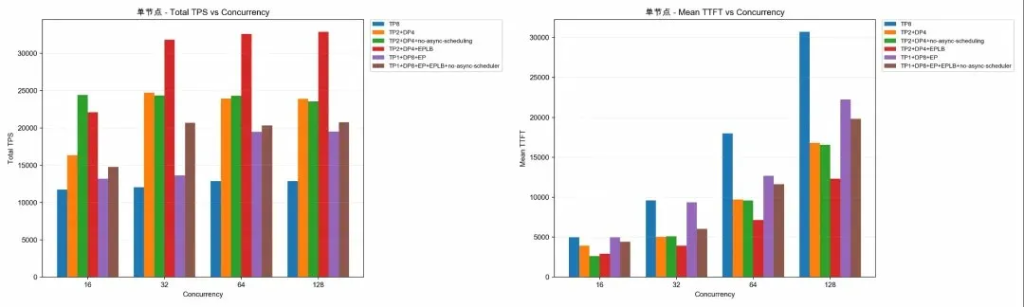
Figure 3.1 — Single Node: Total TPS vs Concurrency & Mean TTFT vs Concurrency
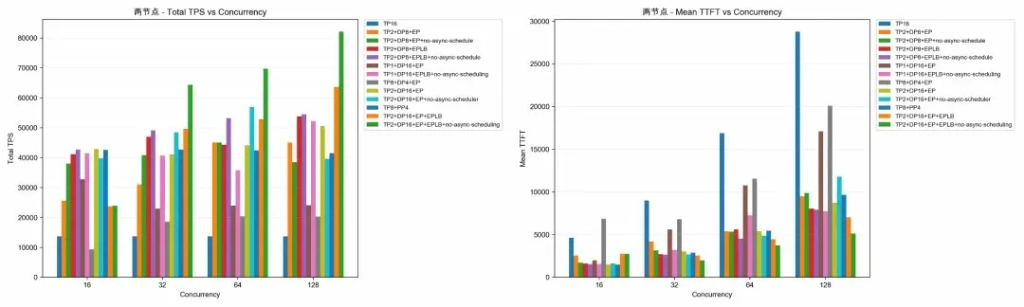
Figure 3.2 — Two Nodes: Total TPS vs Concurrency & Mean TTFT vs Concurrency
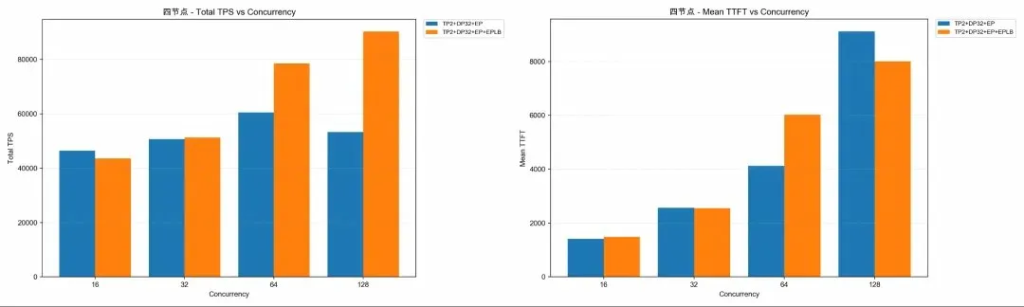
Figure 3.3 — Four Nodes: Total TPS vs Concurrency & Mean TTFT vs Concurrency
04 — Finding the 'Sweet Spot' Within the Hopper Architecture
The Prefill phase is responsible for processing input prompts and calculating the key-value cache before generating the first output token. To test the performance of the Prefill phase, we set the output length (OSL) to 1 and the input length (ISL) to 4096, and conducted comparative tests in single-machine and dual-node scenarios.
4.1 Benchmark Commands (Example)
Here is a sample benchmark test command, which will be used as the basis for all subsequent modifications:
--model /gpfs/rd/models/DeepSeek-V3.2 \
--dataset-name random \
--random-output-len 1 \
--random-input-len 4096 \
--num-prompt 256 \
--trust-remote-code \
--max-concurrency 16 \
--request-rate inf
4.2 Single Node (8× GPU): Baseline vs Optimisation
A single node has a total of 8 GPUs.
BaseLine: Use -tp=8 as the baseline control group.
Optimisation: Use -tp=2 and -dp=4, along with other optimisation parameters, as an optimisation control group.
Test results:
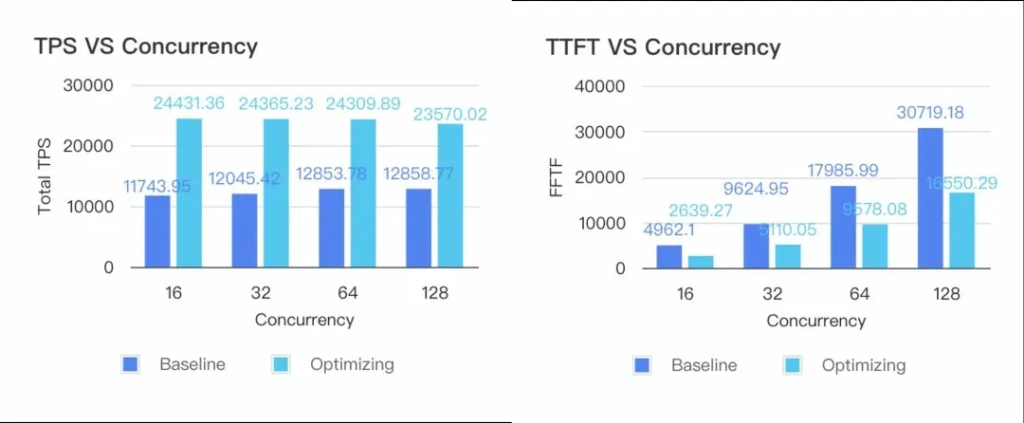
Figure 4.2 — Single Node: TPS vs Concurrency & TTFT vs Concurrency (Baseline vs Optimising)
With a concurrent request count of 16:
- Total TPS (tokens/s): 11,743.95
- Mean TTFT (ms): 4,962.10
- Total TPS (tokens/s): 24,431.36
- Mean TTFT (ms): 2,639.27
- Total TPS increased by 108%.
- Mean TTFT decreased by 46.81%.
- Optimised Prefill Token/Second/GPU: 3,053.92
- Meets the pre-defined SLA (Prefill Token/Second/GPU ≥ 2000, TTFT ≤ 3s)
4.3 Dual-Node (16× GPU): Baseline vs Optimisation
A single node has 8 GPUs, so a dual-node setup has a total of 16 GPUs.
BaseLine: Use -tp=16 as the baseline control group.
Optimisation: Use -tp=2 and -dp=8, as well as other optimisation parameters such as enabling EPLB, as optimisation groups.
Test Results:
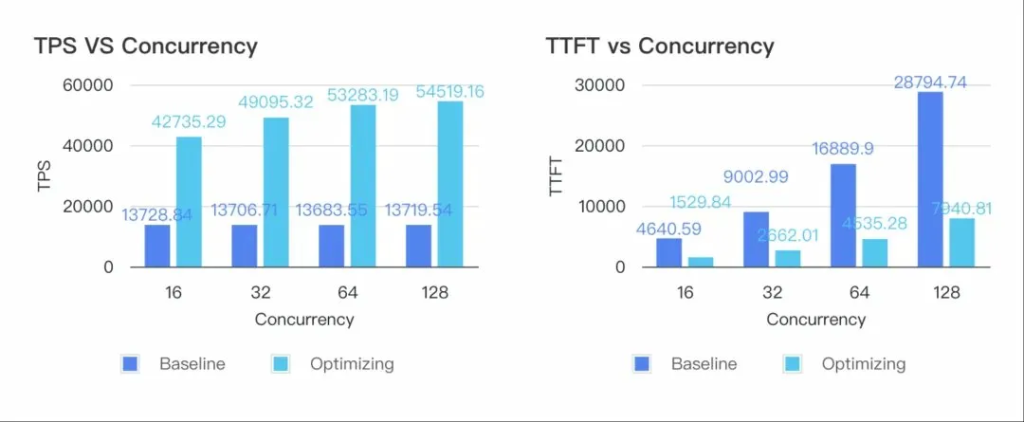
Figure 4.3 — Dual-Node: TPS vs Concurrency & TTFT vs Concurrency (Baseline vs Optimising)
With a concurrent request count of 32:
- Total TPS (tokens/s): 13,706.71
- Mean TTFT (ms): 9,002.99
- Total TPS (tokens/s): 49,095.32
- Mean TTFT (ms): 2,662.01
- Total TPS increased by 258.18%.
- Mean TTFT decreased by 70.43%.
- Optimised Prefill Token/Second/GPU: 3,068.46
- Meets the pre-defined SLA (Prefill Token/Second/GPU ≥ 2000, TTFT ≤ 3s)
4.4 Key Pitfalls to Avoid When Prefilling
4.4.1 The Impact of Enabling Async Scheduling
This log always appears when deploying: DP Using CPU all reduce to synchronise DP padding between ranks.
After investigating the code, it was found that it would be used after being enabled. The results showed that disabling asynchronous scheduling resulted in better performance.
Then, by capturing profile files, the time taken in this step was analysed to confirm whether it met expectations. Profile coordinate_batch_across_dp.
After enabling asynchronous scheduling: coordinate_batch_across_dp
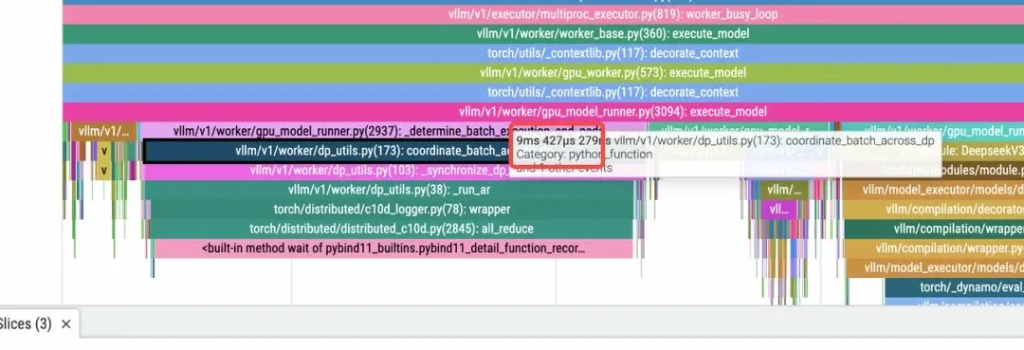
Figure 4.4a — Profile trace: async scheduling enabled (9ms on coordinate_batch_across_dp)
After disabling asynchronous scheduling: coordinate_batch_across_dp
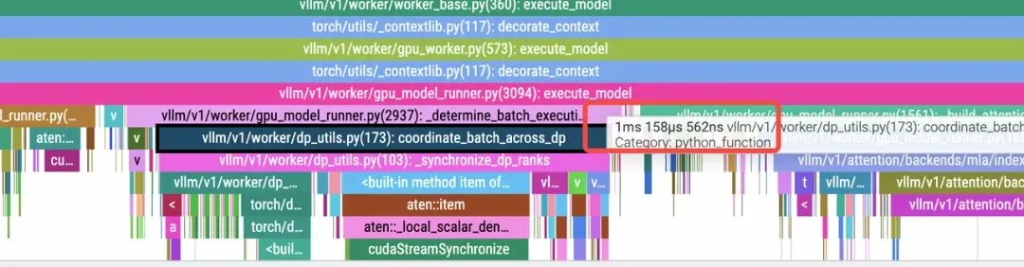
Figure 4.4b — Profile trace: async scheduling disabled (1ms on coordinate_batch_across_dp)
This shows that the time consumed is much less when asynchronous scheduling is not enabled.
It was later discovered that this was related to the characteristics of the workload tested separately, which would lead to increased communication overhead in this scenario for Prefill.
After feedback was submitted to the community, this feature was fixed through a PR (https://github.com/vllm-project/vllm/pull/32197). When asynchronous scheduling is enabled, synchronous scheduling can be disabled through settings: --no-disable-nccl-for-dp-synchronization.
According to the test results, the lack of asynchronous scheduling during the phase has a certain impact on throughput and efficiency. Below are some actual test data for Prefill TTFT:
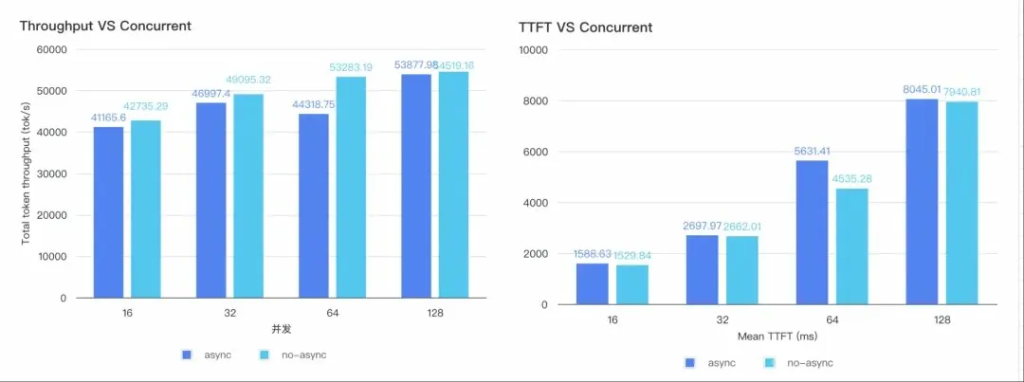
Figure 4.4c — Throughput vs Concurrent & TTFT vs Concurrent (async vs no-async scheduling)
4.4.2 Why Set It to TP2?
The large GEMM operations of Prefill are well-suited for fragmentation. Logically, assuming no communication overhead, a larger internal TP leads to better TTFT optimisation. However, there's a problem where larger TP results in worse performance, a conclusion confirmed by single-node and dual-node test data for DeepSeek-V3.2 TP.
The core issue is that the current kernel architecture only supports a multiple of the head count. DeepSeek V3.2 has a total of 128 heads, meaning the optimal partitioning is only achieved with 128 heads per Rank and 64 heads per Rank (divisible by 64). This introduces head redundancy, resulting in additional computational and memory overhead, directly slowing down performance. Therefore, the strategy was adjusted to TP2 + DP (data parallelism), which is the mathematically optimal solution for the current architecture.
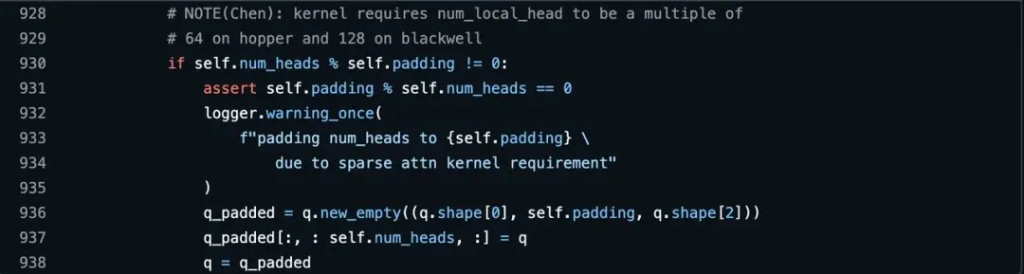
Figure 4.4d — Kernel code: num_local_head must be a multiple of 64 (Hopper) or 128 (Blackwell)
However, when running on a Blackwell architecture GPU, the optimal parameter becomes TP1.
05 — Decode Optimisation Practices
Decode is characterised by small, memory-bound computation patterns. It is sensitive to TPOT (Time Per Output Token). After completing the Prefill optimisation, the team turned attention to Decode.
5.1 Single Node
Compared to Baseline, Decode's throughput is almost double:
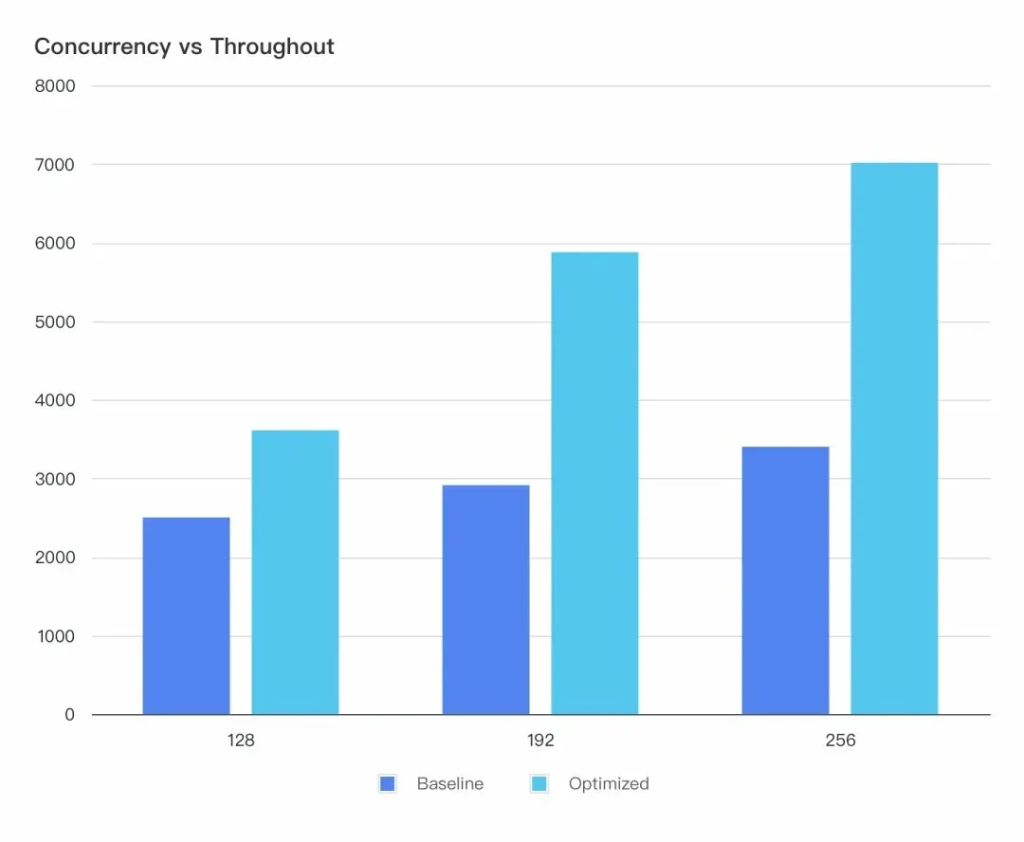
Figure 5.1a — Concurrency vs Throughput (Baseline vs Optimised, single node)
TPOT has also dropped significantly to meet the TPOT requirement.
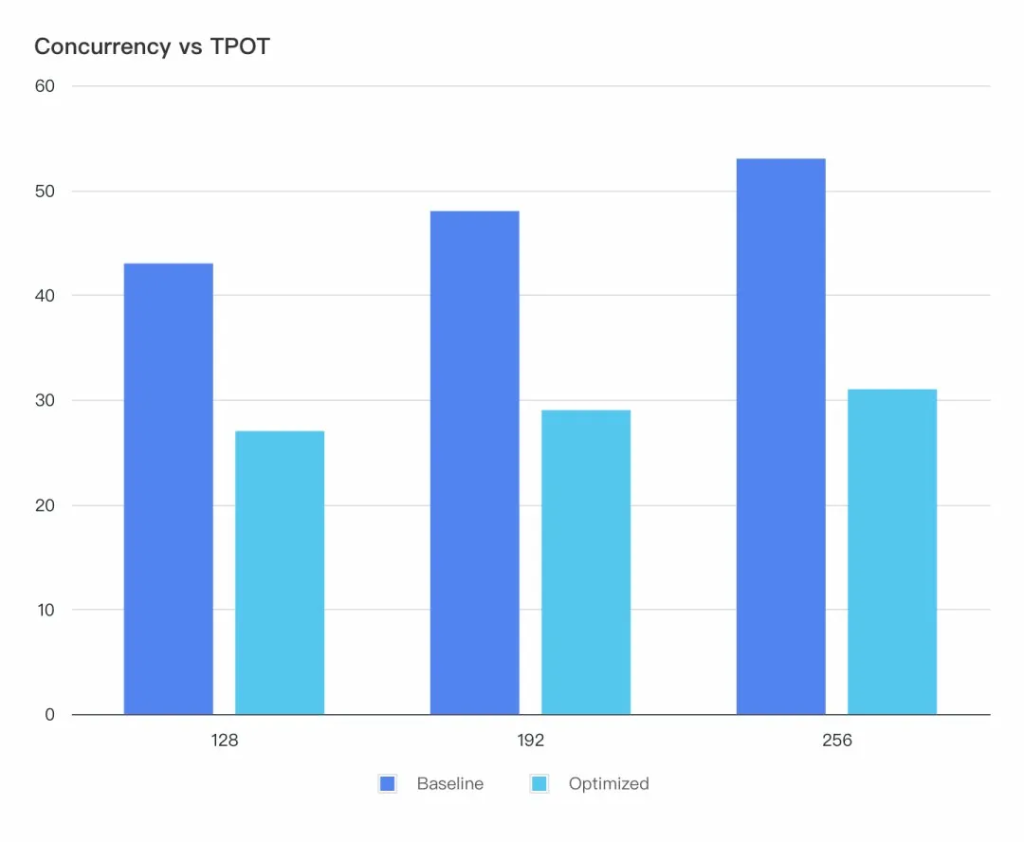
Figure 5.1b — Concurrency vs TPOT (Baseline vs Optimised, single node)
5.2 Dual-Node
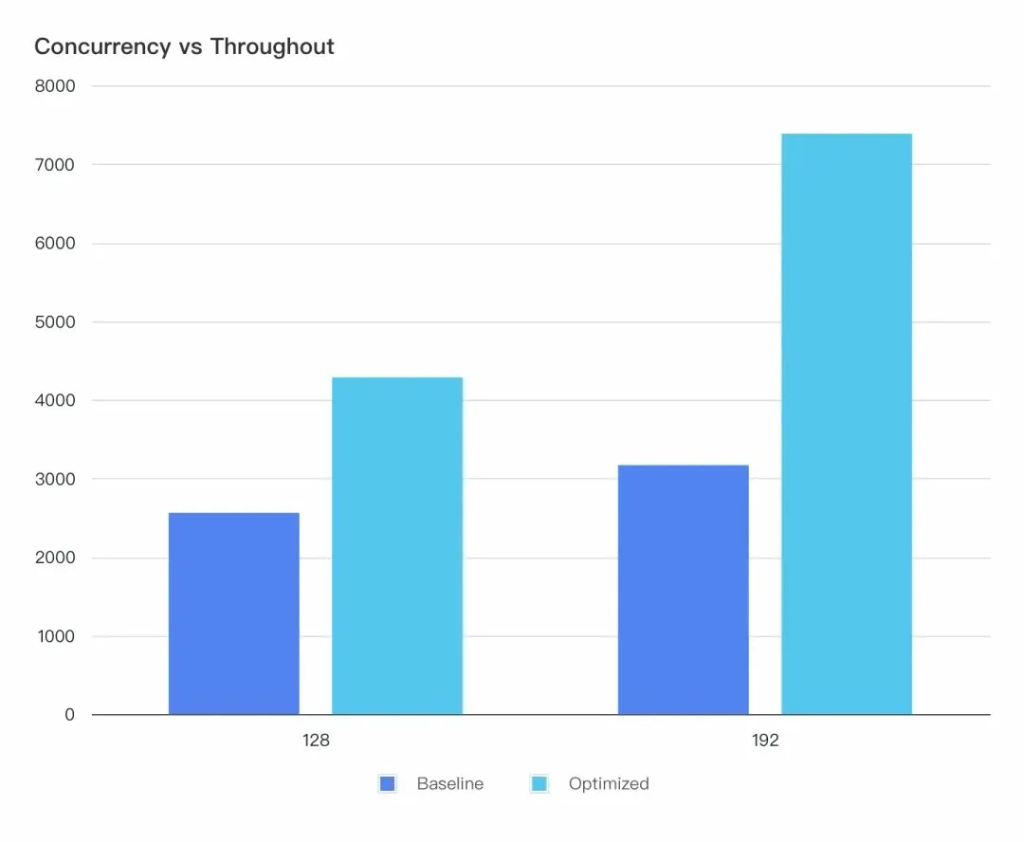
Figure 5.2a — Concurrency vs Throughput (Baseline vs Optimised, dual-node)
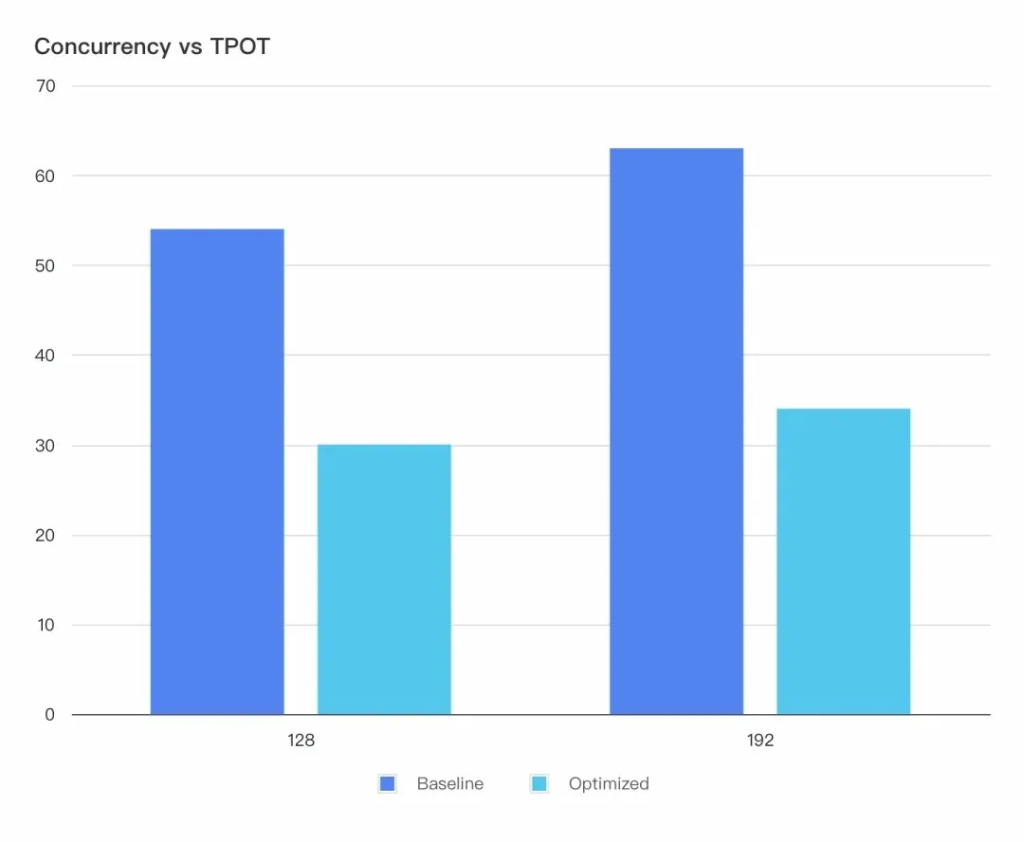
Figure 5.2b — Concurrency vs TPOT (Baseline vs Optimised, dual-node)
5.3 Key Pitfalls to Avoid in Decoding
5.3.1 DSA (V3.2) vs. MLA (V3.1): TPOT Impact Analysis
Under the same TP=8 parallel configuration, the upgrade of the model architecture (MLA → DSA) introduces new computational overhead in the attention mechanism.
This results in an increase in single-step latency (TPOT):
- MLA (V3.1): Single inference step time 11.9371ms.
- DSA (V3.2): Single inference step time is 18.4465ms.
1. End-to-end latency comparison: DSA model latency increases.
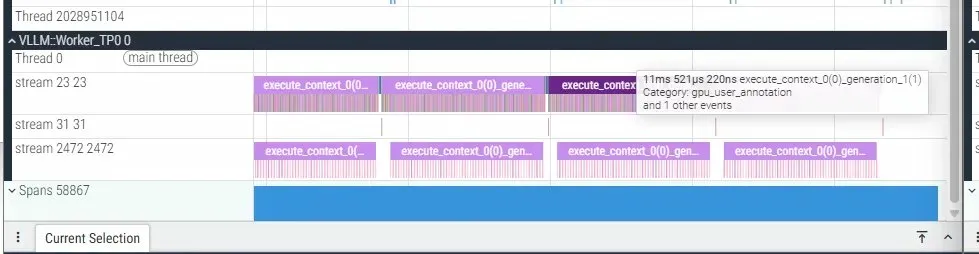
Figure 5.3a — MLA (V3.1): 11ms per inference step
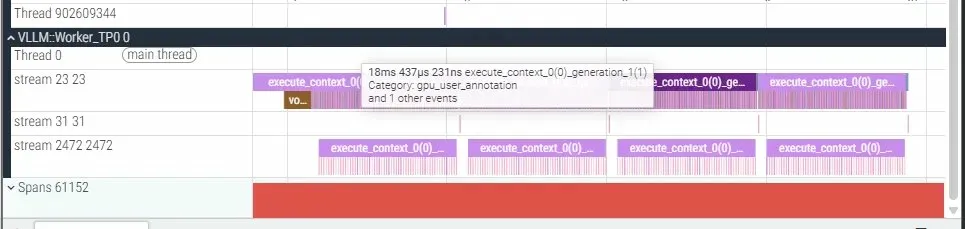
Figure 5.3b — DSA (V3.2): 18ms per inference step
- MLA (V3.1): 11ms time per inference step.
- DSA (V3.2): 18ms time per inference step.
- Difference: The single-step latency of DSA has increased by 7ms.
Delay Increment Analysis: Overhead of Attention (Attn) Operator Layer
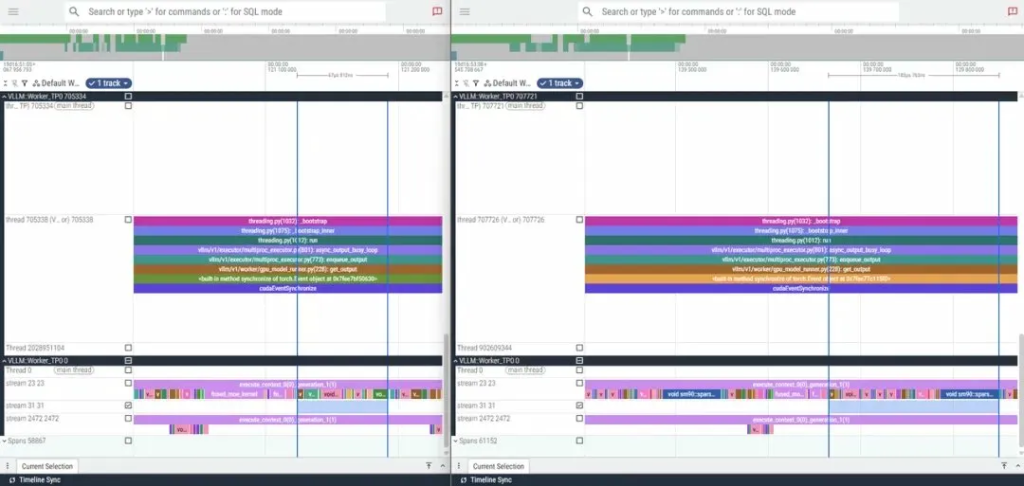
Figure 5.3c — Attention operator trace: MLA (67µs) vs DSA (183µs) — 116µs per layer × 61 layers = 7.076ms total
- MLA execution path: cross_device_reduce_1stage → FlashAttnFwdSm90, taking 67µs.
- DSA execution path: cross_device_reduce_1stage → sparse_attn_fwd_kernel, taking 183µs.
- Inter-layer increment: DSA's attention computation is 116µs slower than MLA's at each model layer. In a multi-layer model architecture, this overhead is accumulated and amplified layer by layer, resulting in a total latency increment of (61 × 116µs) / 1000 = 7.076ms across 61 layers.
2. DSA optimisation for long contexts
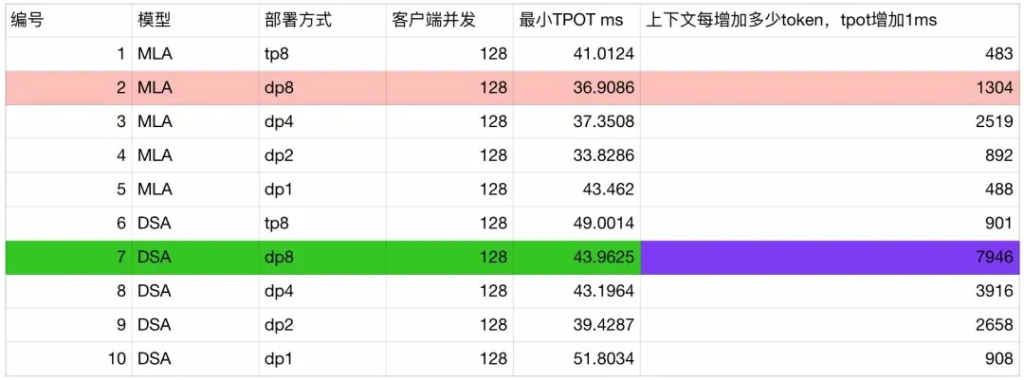
Figure 5.3d — MLA vs DSA deployment comparison table: minimum TPOT and tokens-per-ms-increase by config
Performance comparison analysis of MLA and DSA models under different deployment methods (groups 2 and 7):
- Minimum latency comparison: When the input length is extremely short (context length is 1), the TPOT of the MLA model is 37ms, which is better than the 44ms of the DSA model.
- Throughput efficiency comparison: As the context length increases, the MLA model experiences a 1ms increase in TPOT latency for every additional 1304 tokens; while the DSA model only experiences a 1ms increase in latency for every additional 7946 tokens.
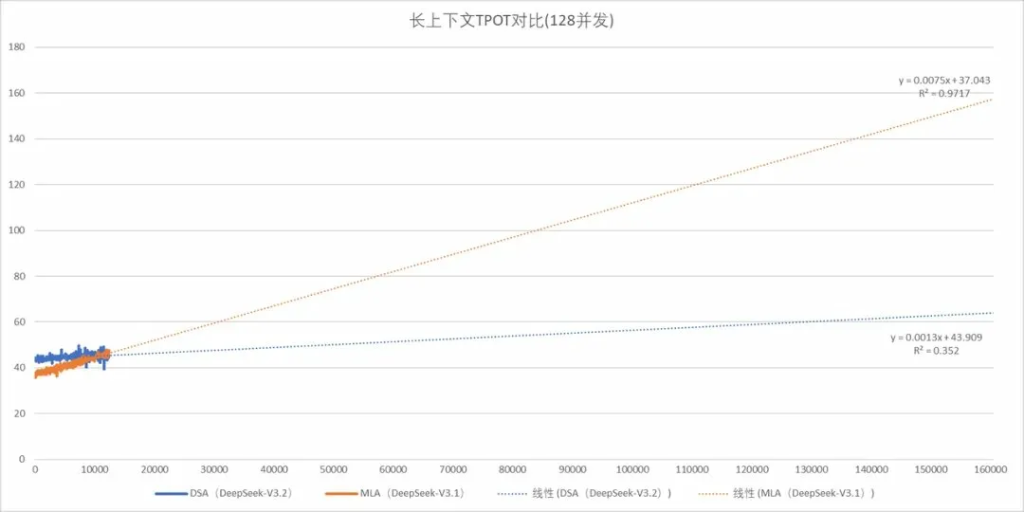
Figure 5.3e — Long context TPOT comparison (128 concurrency): MLA climbs steeply; DSA stays near-flat to 160K tokens
Extrapolating from the actual test results to the default maximum supported context size of 160,000 for DeepSeek, then:
- The MLA model's TPOT is expected to be 160ms.
- The DSA model TPOT is expected to take 64ms.
This validates the argument that the DSA model achieves higher throughput efficiency as the input grows in long context scenarios, resulting in significant end-to-end acceleration. Its performance advantage is even more pronounced in long text processing.
Note: When using the current version, enabling it will result in the following error: Prefill TP2 Decode TP1 Local tensor parallel size 1 is not divisible by remote tensor parallel size 2.
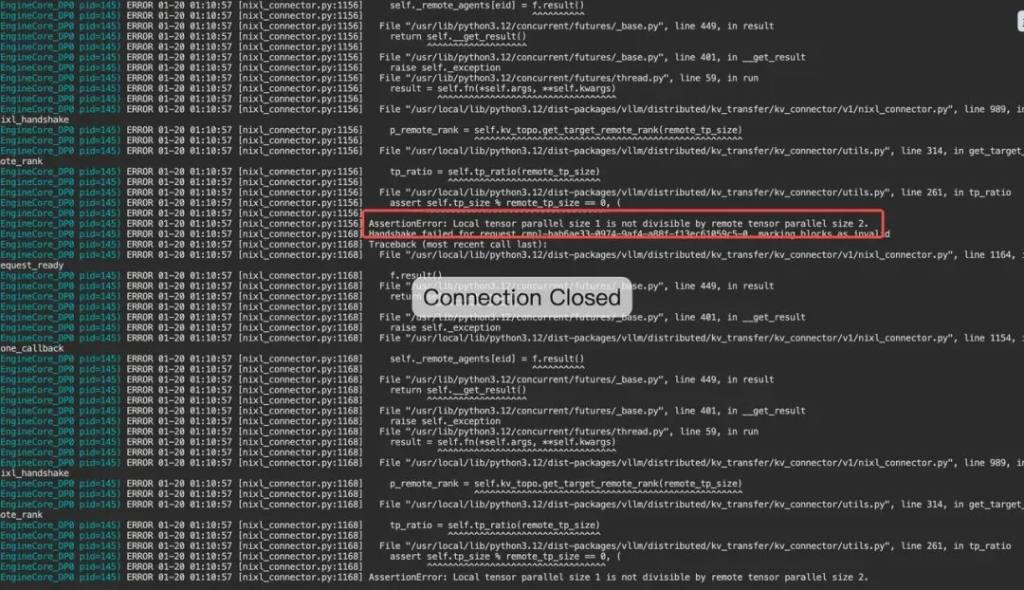
Figure 5.3f — Error log: AssertionError: Local tensor parallel size 1 is not divisible by remote tensor parallel size 2
5.3.2 Setting log_balancedness=true in eplb Significantly Impacts Decoding Performance
During initial testing, it was found that enabling EPLB resulted in a significant performance drop compared to disabling it.
Do not open EPLB:
Successful requests: 948
Failed requests: 52
Maximum request concurrency: 256
Benchmark duration (s): 57.23
Total input tokens: 3883008
Total generated tokens: 284400
Request throughput (req/s): 16.57
Output token throughput (tok/s): 4969.65
Peak output token throughput (tok/s): 6296.00
Peak concurrent requests: 391.00
Total token throughput (tok/s): 72821.93
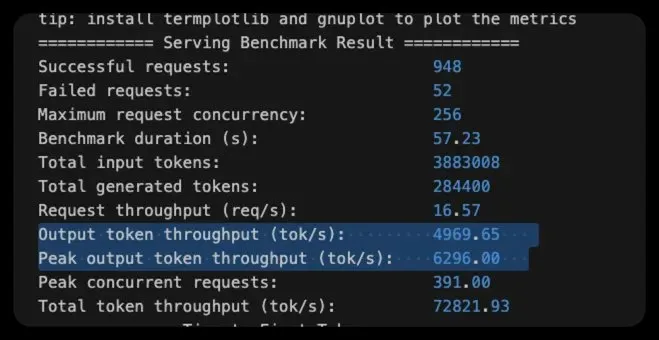
Figure 5.3.2a — Benchmark result: EPLB disabled (output throughput 4969.65 tok/s highlighted)
Core parameter: --eplb-config
Enable EPLB:
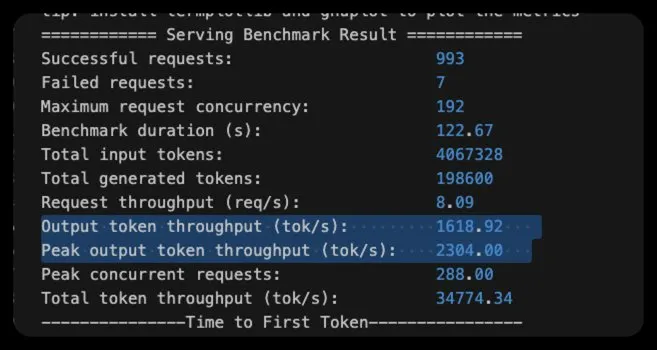
Figure 5.3.2b — Benchmark result: EPLB enabled (output throughput drops to 1618.92 tok/s)
A significant difference was found in the throughput of the output tokens. According to theoretical knowledge, there shouldn't be such a large discrepancy here, so an in-depth analysis was conducted using profiling.
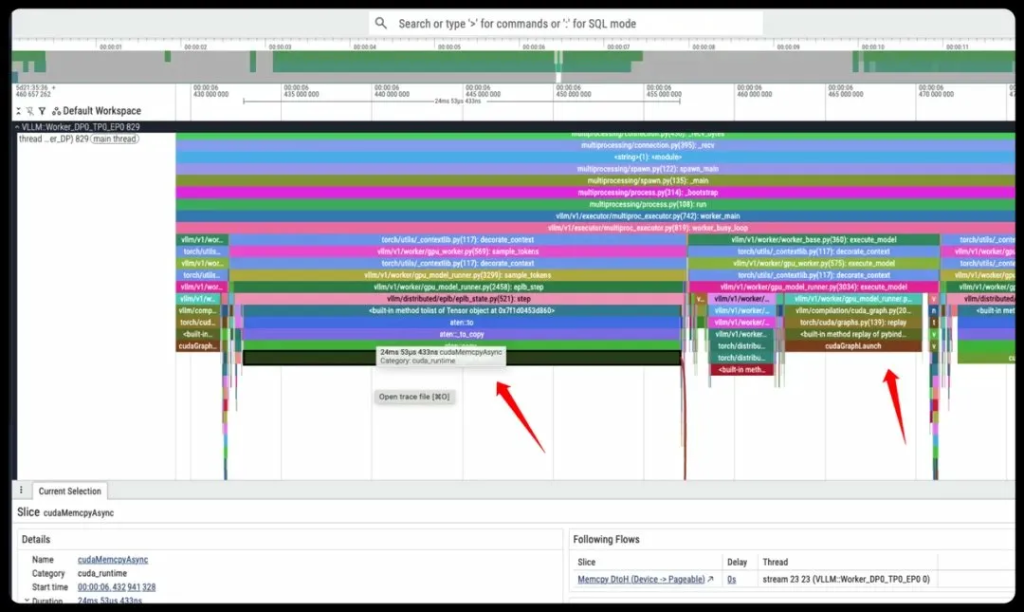
Figure 5.3.2c — Profile trace: eplb-step cudaMemcpyAsync taking 24ms 53µs — far longer than actual Decode execution
It was discovered that after each scheduling, eplb-step took a very long time, longer than the actual execution time of Decode.
This is because during each log process, the load balancing data stored in the GPU needs to be copied into memory before calculation, which consumes a lot of time and computing power.
Data after repair:
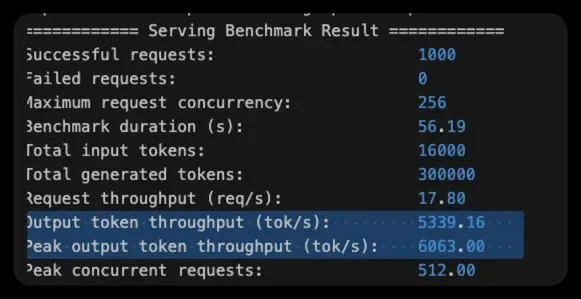
Figure 5.3.2d — Benchmark result after repair: output throughput restored to 5339.16 tok/s
5.3.3 MTP + PD Separation Fails to Work
When MTP is enabled in a PD-separated scenario, two errors will randomly occur once the load test starts:
Error 1: Invalid reshape for topk_indices
(Worker_DP0_TP1_EP1 pid=886837) ERROR 01-09 15:05:37 [v1/executor/multiproc_executor.p...]
(Worker_DP0_TP1_EP1 pid=886837) ERROR 01-09 15:05:37 [v1/executor/multiproc_executor.p...]
Error 2: Assertion failure in fp8_paged_mqa_logits (batch size mismatch)
(Worker_DP0_TP1_EP1 pid=978655) ERROR 01-09 15:49:58 [v1/executor/multiproc_executor.p...]
(Worker_DP0_TP1_EP1 pid=978655) ERROR 01-09 15:49:58 [v1/executor/multiproc_executor.p...]
In-depth investigation revealed that during the PD separation, some requests lacked MTP draft results and required padding (alignment). However, the code did not handle some of this padding well, causing the error. This has now been fixed: https://github.com/vllm-project/vllm/pull/32175
06 — Production Deployment Path
Based on the different optimisation methods for Prefill and Decode mentioned above, the optimisation parameters for the P and D roles are quite different, and hybrid deployment is clearly not the optimal solution. Therefore, the team ultimately adopted a P/D separation architecture (Prefill/Decode Separation).
Architecture Topology
A 2P1D production cluster was built using the native Kubernetes LLM-D and LWS projects.
- TP2 is the configuration with the highest computing power utilisation. The dual nodes can provide good concurrency support while meeting the TTFT SLO limit.
- As the concurrency increases, it is relatively easy to scale up or down based on the previous model.
- Single-node memory can easily exhaust the KV cache, leading to OOM (Out of Memory) errors. Dual-node memory provides a larger KV cache space to support high-concurrency decoding.
The final deployment adopts a 2P1D architecture, which can support high throughput and concurrency while meeting the SLA. As concurrency increases, P can be expanded to support higher throughput. (Deployment architecture diagram below)
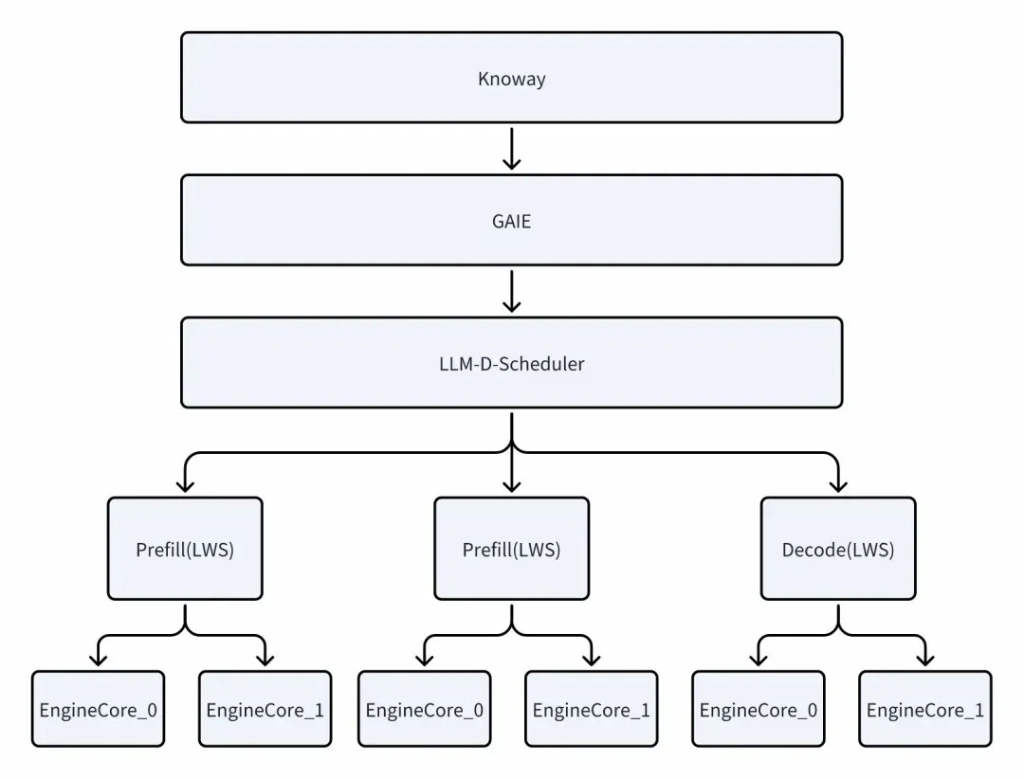
Figure 6.1 — 2P1D Deployment Architecture: Knoway → GAIE → LLM-D-Scheduler → Prefill(LWS) × 2 + Decode(LWS) → EngineCores
In a P/D separation scenario, it is difficult to obtain data that meets expectations using max-concurrent. Therefore, a combination of request-rate and max-concurrent is used to control the sequence data processed by the server.
Under the 2P1D architecture, the system demonstrated powerful throughput capabilities:
- Maximum throughput: 85,000 tokens/s (without using prefix caching)
- Concurrency capability: Supports Request Rate = 24 req/s and Max Concurrent = 170, and the SLA remains robust and meets the target under this load.
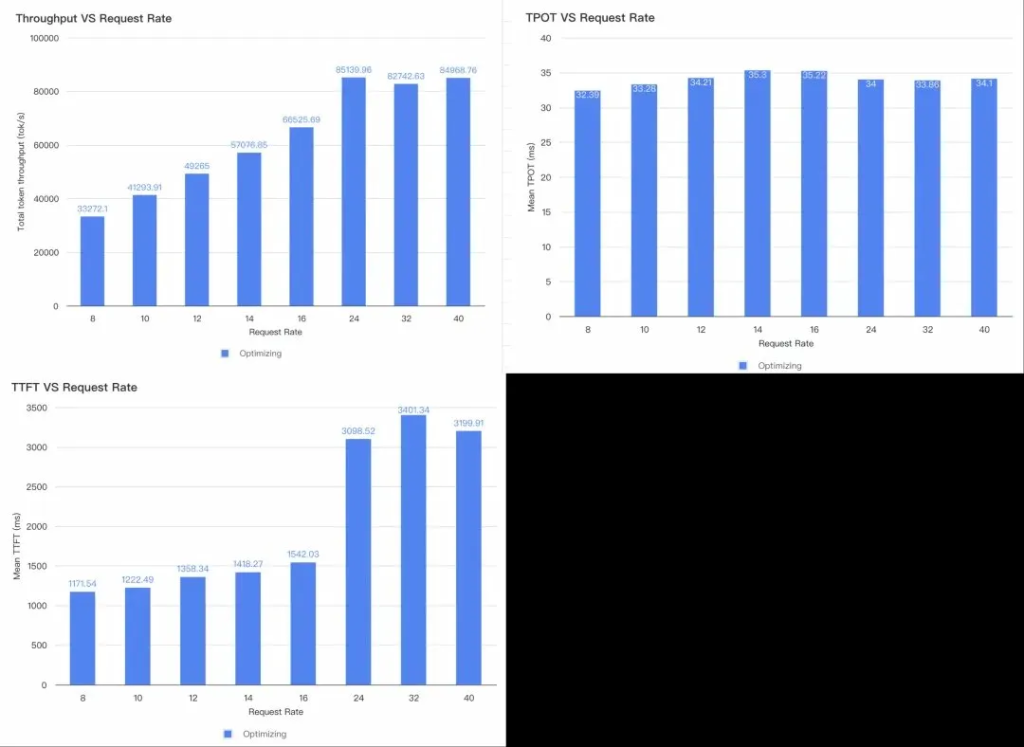
Figure 6.2 — Production performance: Throughput vs Request Rate (peak 85,139 tok/s), TPOT vs Request Rate (~34ms), TTFT vs Request Rate
Monitoring data: The following are the throughput data and TTFT data of each Engine in P/D as viewed from the monitoring. It can be seen that they meet the SLA, and the first token latency is stable at around 2.84s (P90).
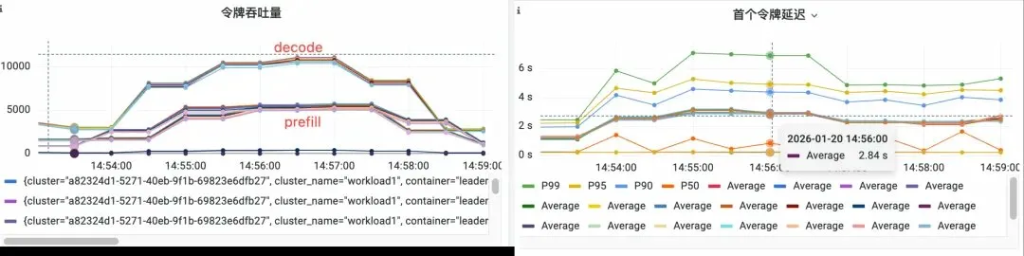
Figure 6.3 — Monitoring: Token throughput (decode/prefill) & First token latency time-series (P90 Average 2.84s)
The GPU SM Activity in the Prefill service can reach 50%, and NVLink RX/TX can reach 30GB/s; the load on the Prefill and Decode nodes is also relatively stable and balanced.
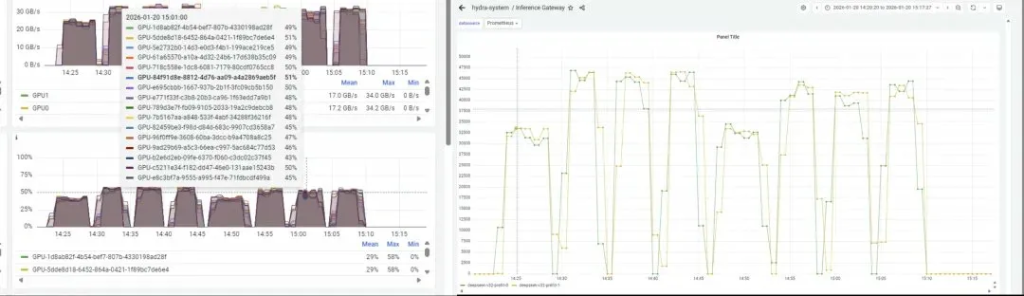
Figure 6.4 — GPU SM utilisation (~50%) & NVLink throughput (up to 30GB/s) across Prefill and Decode nodes
6.1 Introduction to the Technical Framework
The team used LLM-D for cloud-native P/D separation coordination and orchestration, which provides excellent functionality and performance support for both control flow (deployment, startup) and data flow (PD gateway, KV-routing).
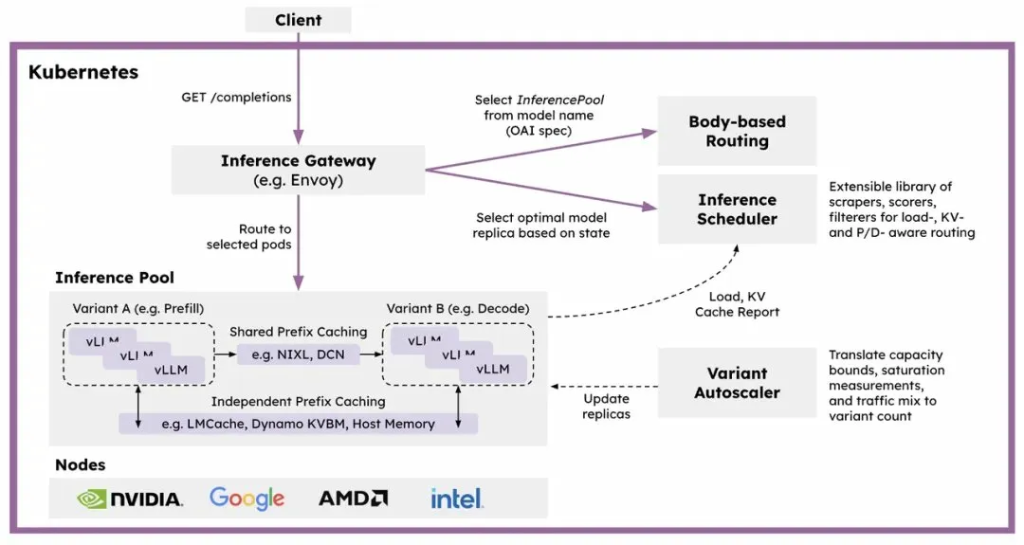
Figure 6.5 — LLM-D architecture: Client → Kubernetes Inference Gateway → InferencePool (Prefill/Decode variants) with Body-based Routing, Inference Scheduler, and Variant Autoscaler
llm-d Introduction: llm-d is a high-performance distributed LLM inference framework native to Kubernetes, enabling rapid value creation and offering highly competitive cost-effectiveness. Built on vLLM, Kubernetes, and an inference gateway, llm-d provides a modular distributed inference solution with features such as key-value cache-aware routing and decoupled services.
The team also adopted LWS as a cloud-native orchestration for a single vLLM instance across multiple nodes.
LeaderWorkerSet (LWS) Introduction: An API for deploying a set of Pods as a unit of replication. It aims to address common deployment patterns for AI / ML inference workloads, particularly multi-host inference workloads where LLMs are sharded and run on multiple devices across multiple nodes. The initial design and proposal can be found at: http://bit.ly/k8s-LWS
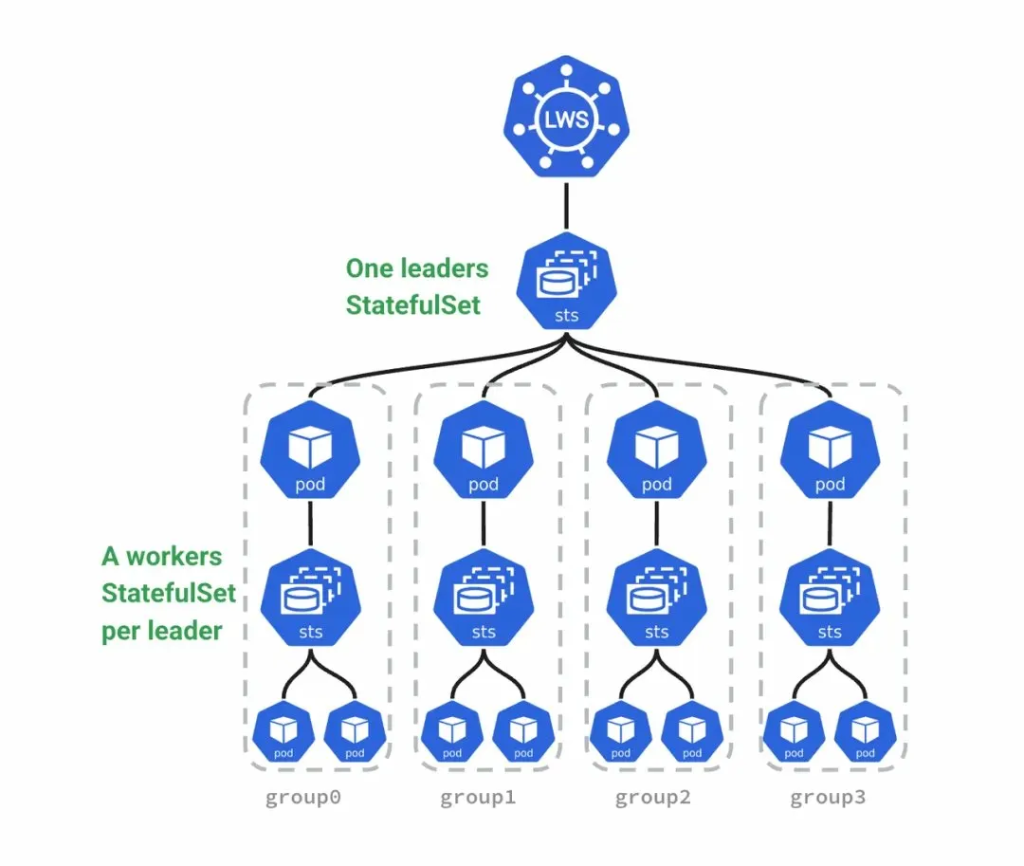
Figure 6.6 — LeaderWorkerSet (LWS): One leaders StatefulSet → A workers StatefulSet per leader across group0–group3
07 — Summary
During the deployment and problem-solving process, the team received a lot of help from vLLM community members, and we would like to thank the community here. Team members also raised many issues encountered and recorded them, and submitted PRs with solutions to the problems to give back to the community.
This technical report documents the full journey from SLA definition through to production deployment of DeepSeek-V3.2 at 85,000 tokens/s on UIS Cloud infrastructure. Key achievements include:
- Achieved 85,000 tokens/s total throughput in production (2P1D architecture, no prefix caching)
- Met all SLA targets: Prefill Token/s/GPU ≥ 2000, TTFT ≤ 3s (P90: 2.84s), TPOT ≤ 40ms
- Optimised single-node prefill throughput by 108% and dual-node by 258% vs baseline
- Identified and contributed fixes for async scheduling, EPLB log_balancedness, and MTP+PD separation bugs upstream to vLLM
- Established TP2+DP as the mathematically optimal Hopper architecture configuration for DeepSeek V3.2
Ready to Optimize Your AI Inference?
Learn how UIS Cloud's d.run platform and AI stack can deliver hyperscale inference performance for your organization.